
REA: Reverse Engineering with Traceable Evidence
Want to understand a software feature but do not know where to begin reading files or code? REA lets an AI assistant call software-analysis tools to investigate. This article explains the evidence available, how to read it, and which conclusions the analysis cannot support.
REA connects AI agents with software understanding tools.
REA stands for Reverse Engineer Anything. It is morluto’s project allowing coding agents to call software-analysis tools through MCP. The same tools are available through CLI. Results include supporting evidence such as decompiled code, machine instructions, and function relationships, with unanswered questions identified. Read an overview of REA from the original project
Here, reverse engineering means studying an existing program or file to understand its behavior and structure. Findings can help explain features, check compatibility, or inform original code. Decompiled output may differ from the original source because compilation can discard names, comments, and structure.
KrobClick sees this integration as reducing manual copying between tools and agents. Start with a specific question such as “Where does this export button get its file data?” and let the agent locate evidence. Answers then point to original locations for checking rather than relying only on screenshots or feature names.
Agent asks questions and REA returns evidence from the tool.
The user states what they want to know; the agent splits it into subquestions and uses REA analysis tools. With results and evidence, it explains findings or investigates further. Tools read or observe within supported boundaries; the agent interprets the information.
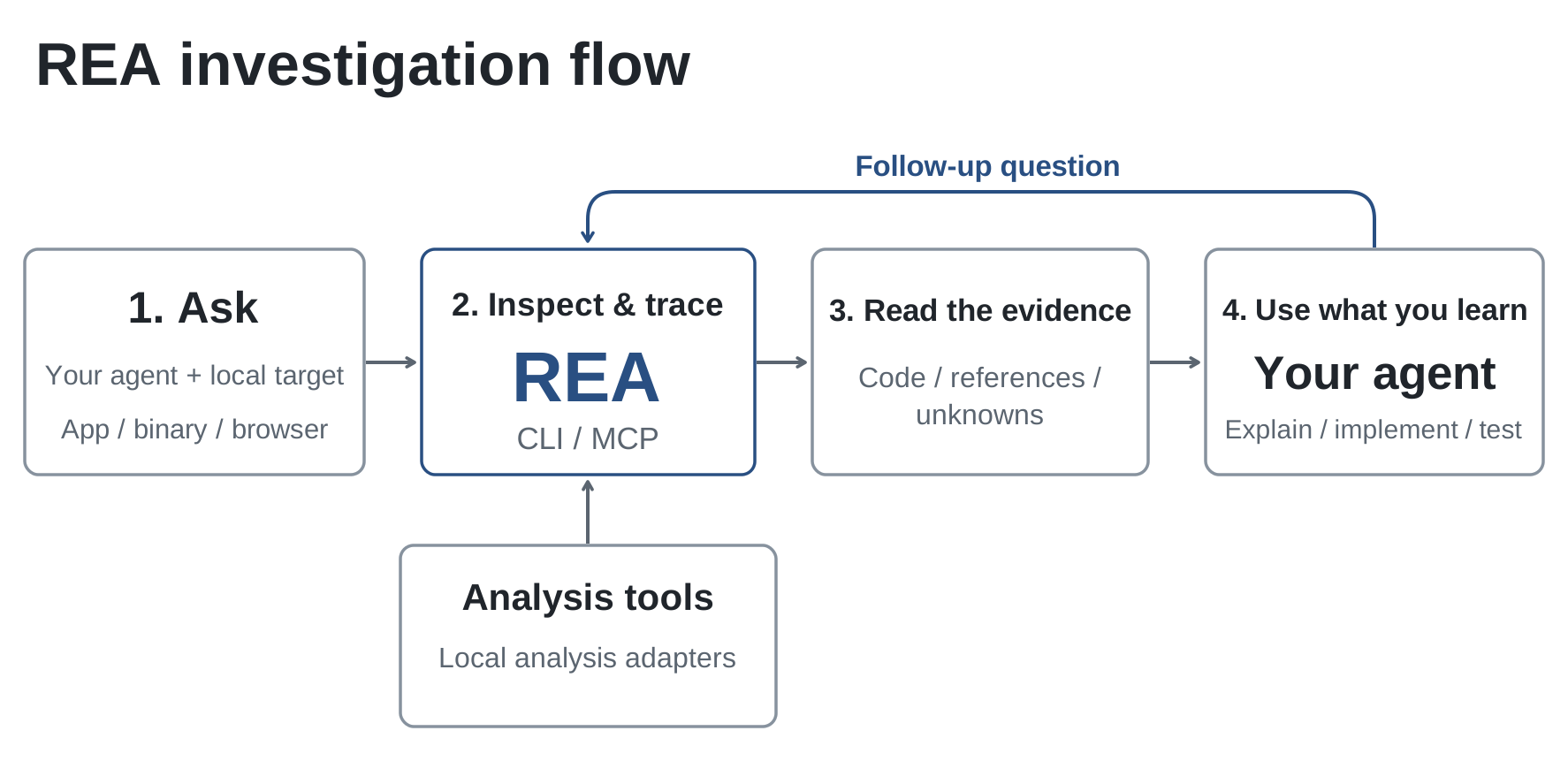
MCP connects agents to tools; REA connects their work to analyzers such as Ghidra, Hopper, or IDA. It is neither another AI model nor a universal replacement for those analyzers. Native analysis may require these providers, while JavaScript can be read statically without running code or using native analyzers.
KrobClick suggests separating tool findings, agent interpretations, and tested behaviors. If an answer generalizes from a code excerpt to claim the app always behaves that way, check function call sites, conditions, and unexamined cases before using that conclusion.
What can REA be used with?
REA supports websites, desktop apps, executables, Android apps, firmware, and network captures, using different analysis methods and auxiliary tools. This table summarizes main-branch documentation checked October 23, 2026. Match it to the installed version and tools actually connected to your agent.
| Category | Sample file or work | What can be analyzed | Conditions and limitations |
|---|---|---|---|
| Website / Web App | SaaS, Web AI or Dashboard with access | Page structure, JavaScript, and observable network requests | Connects to Chrome-family browsers through CDP; sees only page-exposed data and the recorded period, not all server-side code |
| Browser Extension | Chrome or Edge extension | It has not yet been confirmed that direct extension analysis is supported. | The reviewed documentation does not yet provide specific steps for Manifest, Extension APIs, or files .crx; Reading the isolated JavaScript does not confirm the behavior of the entire extension. |
| Windows program | Native files .exe, .dll in PE format | Functions, assembly instructions, pseudocode, and function call points | There must be an analyzer such as Ghidra, Hopper, or IDA that supports the file; File .exe or .dll which is .NET uses another group of analysis. |
| macOS program | App pack .app and Mach-O files | App-bundle structure, file listings, and component relationships; native code can be analyzed further with supported tools | Inspecting app structure and decompiling code are separate steps. Match the program file and architecture to the analyzer. |
| Linux program | ELF executables and libraries .so | Functions, machine instructions, symbols, and references in the binary | The file formats and architectures supported by the analyzer must be checked; The file's operating system name does not indicate which machine it can be analyzed on. |
| Android apps | Files .apk | Manifest data, classes, decompiled methods, and references | Requires headless JADX and the full Java Development Kit (JDK); This job reads files without running the app. and does not include automatic analysis of native libraries within the APK. |
| .NET program | Assembly created in C# or other .NET languages. | Metadata, Common Intermediate Language (CIL) instructions, methods, and native-code call declarations | Static review without loading or running code does not confirm runtime behavior |
| Electron app | App folder or file .asar | JavaScript modules, imports, source maps, and interprocess communication through IPC | Can be inspected without running the app, but runtime-generated names or paths may not be fully traceable; native add-ons may require separate analysis |
| Games | Native games such as DX-Ball | The logic of the selected function, such as a sound position calculation formula. From machine commands and call points | Use methods suited to the game's file type. A one-function case study does not prove complete source or structure recovery for every game. |
| Package files | .zip, .ipa, .asar | List of contained files, resources, and app structure; Reading the internal code depends on the file type. | Opening the file list does not equal decoding or running the app in its entirety; IPA is an iOS app package, not an Android APK. |
| Firmware | Device firmware files | File sections, internal parsing results, and files that can be passed on for native analysis | Use Binwalk / Unblob on Linux according to the guide, supplying additional tools yourself; this does not emulate or run the entire firmware system |
| Network Capture | Files .pcap, .pcapng that has already been recorded | Protocols, destinations, DNS, TLS SNI, and HTTP request data present in the file | Requires TShark / capinfos. The PCAP summary and packet field selection tools have different operating-system limitations; they do not capture live traffic themselves. |
Sources for choosing analysis methods: List of task types in README, Websites and CDP, JavaScript / Electron / ASAR, Apple app bundles and IPA, Android APK, .NET and Firmware
For PCAP, distinguish two tasks: PCAP summary tool Uses TShark and capinfos, with documented Linux and Windows requirements. macOS still has capture-reading limitations, while Field selection and packet filtering tools require Linux with TShark 4.x and prlimit. Check support for each tool rather than inferring it from PCAP support alone.
Before we begin, let's separate three things: What system does the file come from? What type of system is the machine used for analysis? And what analyzer is installed? For example, Windows game files and running Ghidra on Windows are different conditions. Read. Differences between main code and published packages and check the active REA server's tools before assigning work. This table explains developer documentation, not KrobClick testing all 12 file groups.
Before sharing conclusions, tie evidence to the examined file version or hash, observation window, and uncovered conditions. After an application update, recheck affected paths rather than treating an earlier binary or network capture as proof for every version. This is KrobClick’s reporting criterion, not a claim that REA automatically records all these fields.
Read the evidence to identify what remains an assumption
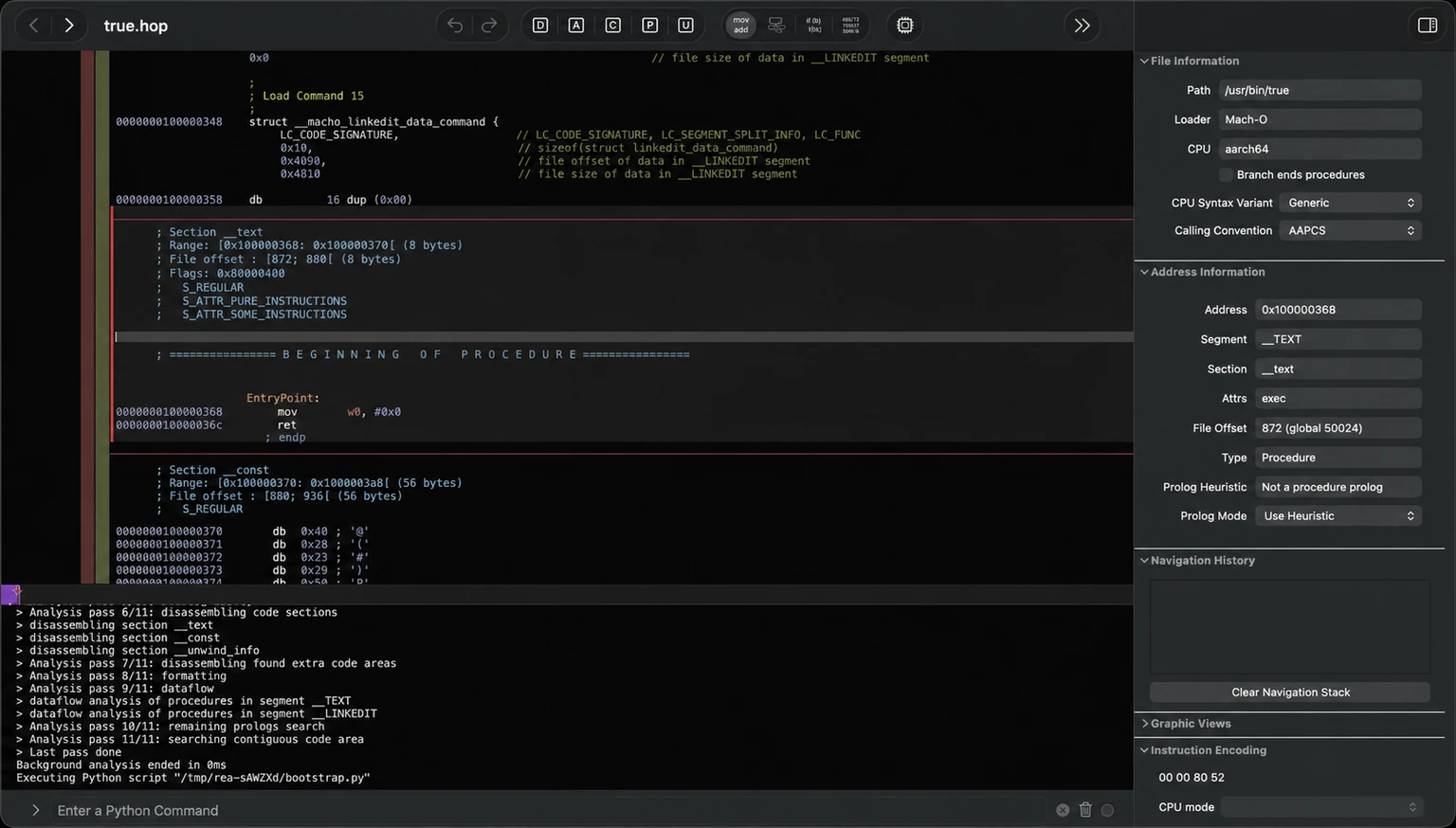
Hopper shows assembly instructions, file data, and analysis logs, which should be distinguished from agent interpretations. Pseudocode is a readable reconstruction, not necessarily original source. Verify its interpretation, especially for optimized binaries with complex structures or lost source information.
To evaluate one answer, KrobClick suggests these questions:
- Where is the evidence: Does it identify a file, source location, or function address you can inspect?
- What supports the conclusion: Did the tool find only a possible code path, or evidence of an actual runtime call?
- What remains unknown: Are any values, communication channel names, or destinations computed at runtime and still unresolved?
- How to test: Which inputs and conditions were used, and what were results compared against?
The project's website analysis guide gives an example of an Export button that loads JSON and creates a CSV. The recorded network information helps verify that the request occurred during that time. As for how to create a CSV file, you'll need to read additional scripts. Therefore, these two parts of evidence are used to answer different questions. And starting to record data does not allow you to see previous activities retrospectively. Example website and network-request analysis
Developer example: using REA to inspect a percentage calculation
Calculator: the percentage button depends on the preceding operator
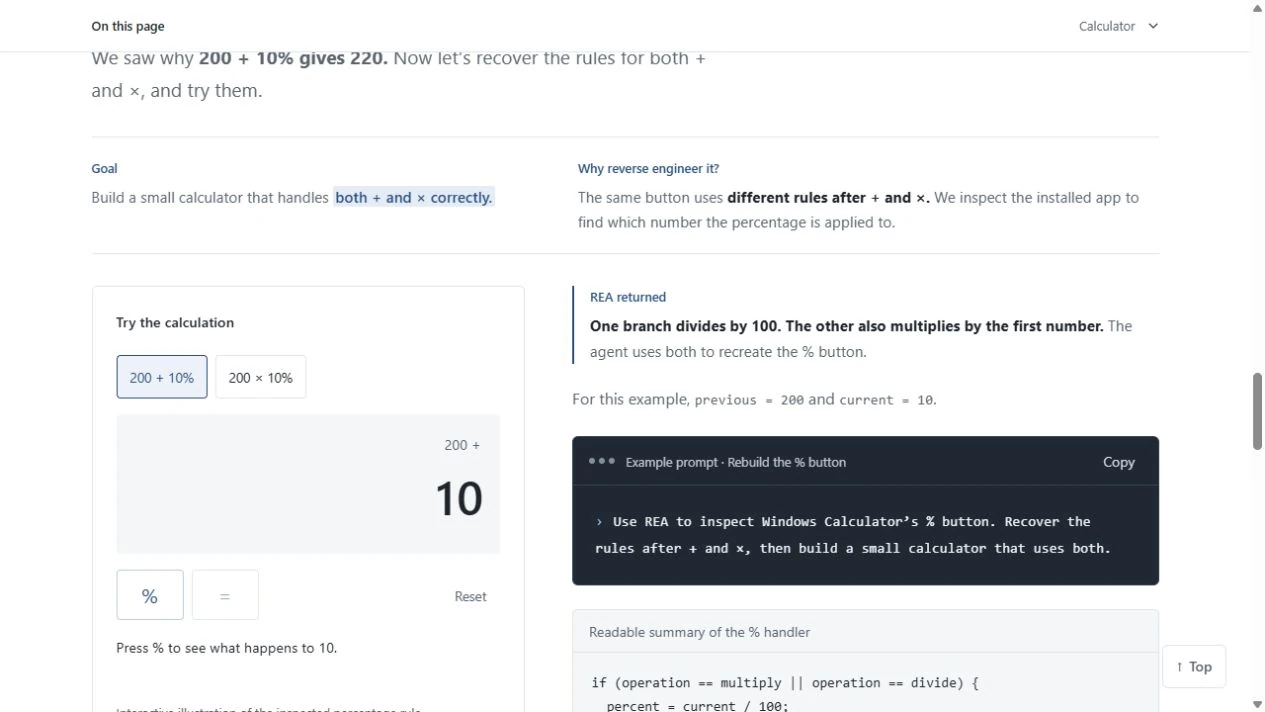
REA uses Windows Calculator as an example, stating that 200 + 10% returns 220 because percentages after plus are based on the first amount, but 200 × 10% returns 20 because 10% becomes 0.1 before multiplication. The project shows a disassembled instruction path compared with Microsoft's source to explain the difference. Example Calculator from REA
Saying that a button divides by a hundred is insufficient without checking the preceding operator and function inputs. To reproduce behavior, test examples with different operators. One input set does not establish every case.
Dinosaur game: Read the speedup rules from the script.
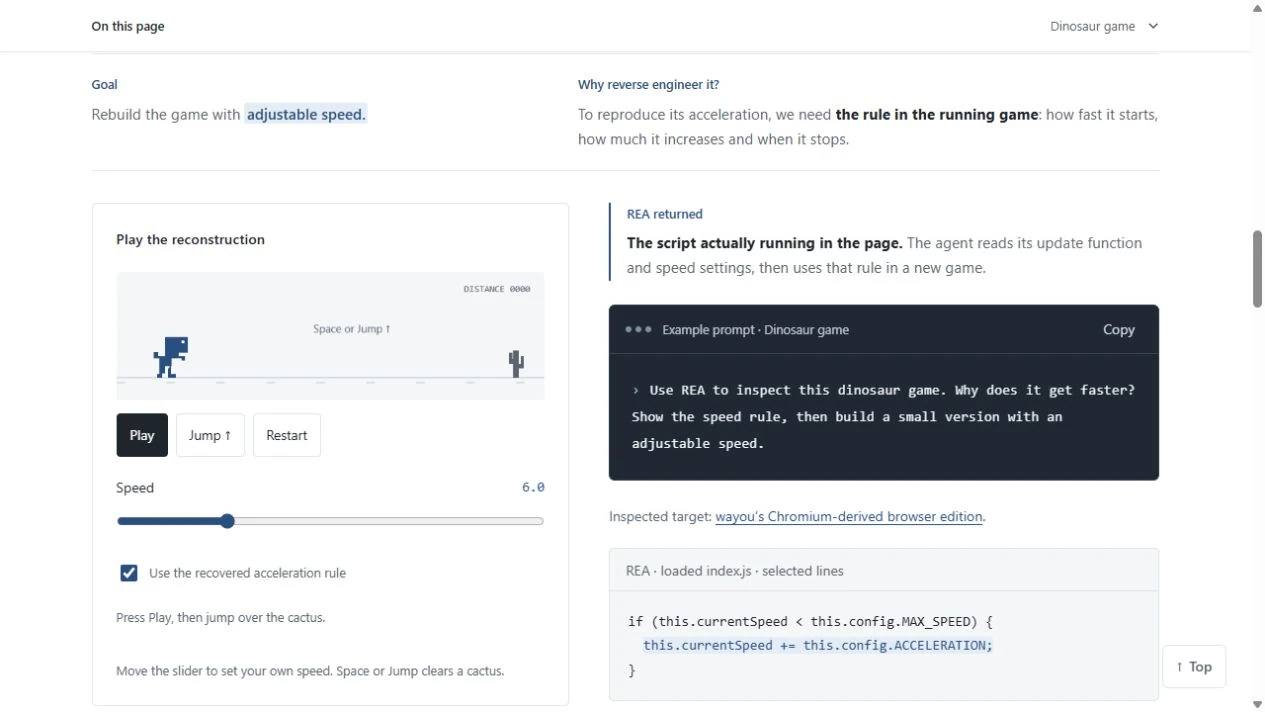
The Dinosaur game example on the REA page shows reading the script to find the speedup rules. Then use that information to create a simulation game that can adjust the speed. Readers can look at the behavior from the simulation game and read the rules used from the accompanying script. View the developer's example
Electron: On-screen buttons may send jobs across processes
The JavaScript/Electron guide follows CSV export in a sample Notes app: renderer → preload scripts and IPC → main process writing the file. REA links channel names to handlers found in code so agents can trace data origins. This is the developer's example, not an inspection of your app. Guide along the CSV export path
For developers, this path reveals that a fix may belong in another process even when the user starts from an on-screen button. If channel names are generated at runtime or the receiving handler remains unidentified, further runtime observation may be necessary.
DX-Ball: When the pseudocode doesn't tell the complete formula.
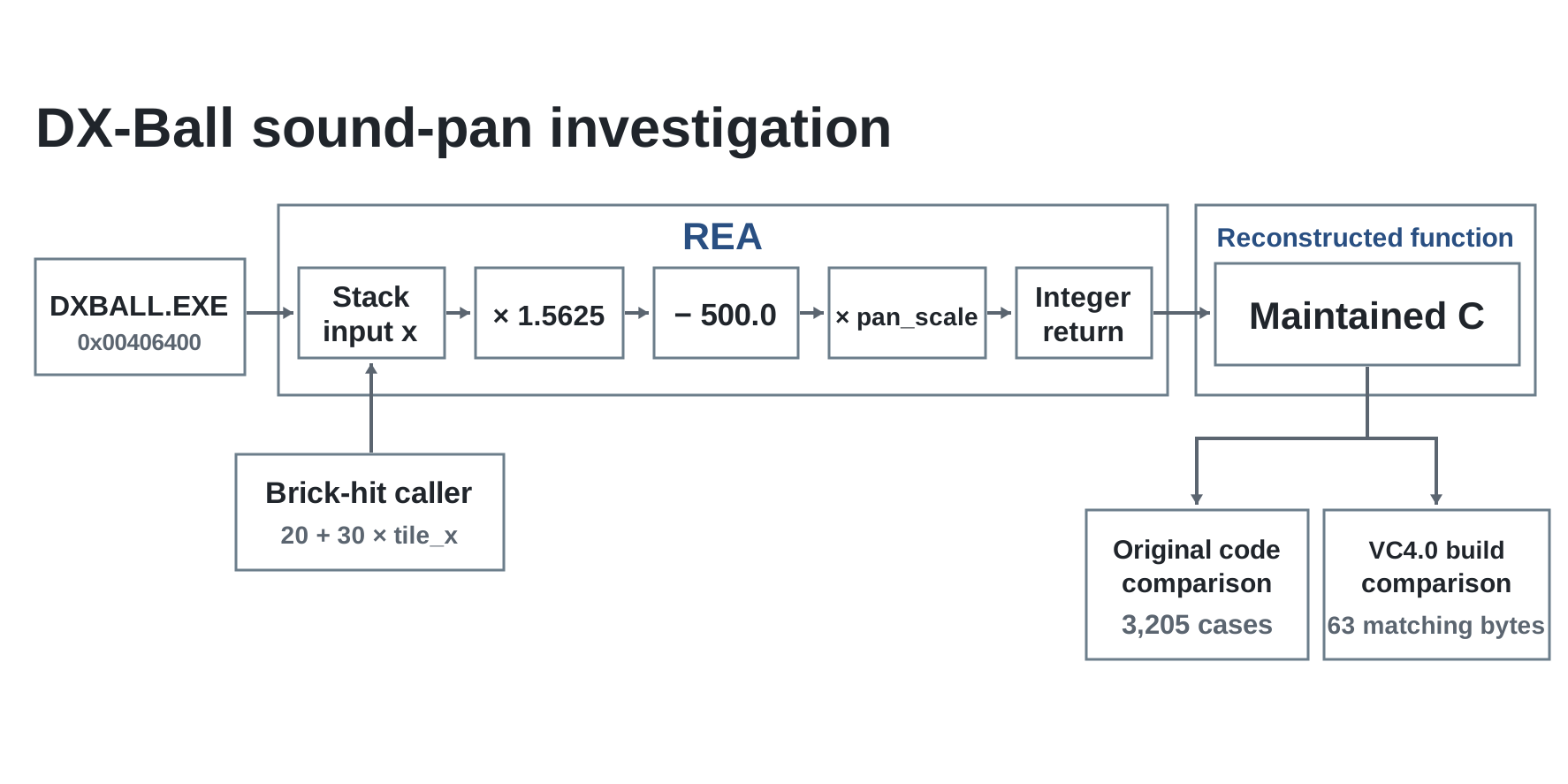
The native-analysis guide examines DX-Ball's left/right audio-position function, whose initial pseudocode was incomplete. Analysts needed machine instructions, call sites, and constants. The project reports comparing rewritten code on 3,205 inputs and reconstructing all 63 function bytes. These are developer-reported case-study results, not REA's overall accuracy. DX-Ball evidence and verification method
Apply these criteria to other tasks: for a formula, specify comparison inputs and outputs; for a workflow, identify its start, end, and intervening conditions. Results establish only what was checked.
Choose a clearly scoped, authorized first task
The rea-agents 6.9.0 package requires Node.js 22.x from 22.23.4, 24.x from 24.22.1, or 26.12.1 or later, with npm. Node.js 23, 25, 26 releases before 26.12.1, and prereleases are outside the supported range. Check the package version and latest installation guide before using it, as requirements may change. Additional tools depend on the file being analyzed. KrobClick did not run this installation command:
npx rea-agents setupDuring setup, select your agent, review the proposed configuration changes, and approve them. Then restart the agent. For native analysis, also check which analyzer and host system are supported. Read the latest installation guide before proceeding, especially the distinction between code on main and the published npm package.
For a first task, KrobClick suggests: “Examine a sample app I have permission to analyze. Explain what data the Export button uses to create a file. Identify the relevant files and functions, separate what the code shows from what is observed at runtime, and state what remains unconfirmed.” This specifies both the question and the evidence to inspect, making the result easier to assess than asking the agent to understand the whole app at once.
Local analysis still requires checking what data the agent sends onward
REA says it analyzes local programs and files without uploading the app to an REA analysis service. However, agents receive tool results; using a network-hosted model may send code or file information as context. Review the model provider's data policy separately. Explanation of information in the project's FAQ
The security policy states that REA is not a sandbox or isolation system to limit the impact of files. Opening a binary lets the analyzer read and interpret its structure with the local user's permissions. Session controls do not protect against malicious processes already running under the same operating-system user. Runtime analysis may also launch or interact with the target program, unlike reading a file without running its code. Read REA's protection boundaries
Define readable folders and data, check model/tool permissions, and choose isolation appropriate to file risks. Before publishing support logs, remove credentials, private paths, and analyzed-program data according to developer security guidance.
REA's MIT license covers the tool, not rights to analyzed software or content. Users must obtain permission and follow applicable rules. Start with your own software, provided examples, or appropriately licensed software.
REA is suitable when you have a clear question and need an evidence-based answer.
REA suits developers tracing behavior across files or app components and software researchers identifying further analysis targets. With complete source and a short-function question, direct code reading may take fewer steps. Ordinary users do not need analysis tools simply to use an app.
Before using an answer, trace it back to the evidence, check whether unknowns are stated, and consider how to test the conclusion with other inputs. These KrobClick criteria help identify further checks, but a person still needs to interpret the results and design tests that address the question.
Read more about assigning agent permissions at Zero-trust for AI agents and role-based task division at OpenRig and the coding agent team Image credits and licenses are at List of Crafting Apps and REA image sources
Original sources and images
- GitHub: morluto/rea — README and project documentation
- REA: Calculator operation and examples
- REA: Native binary analysis — DX-Ball
- REA: JavaScript and Electron analysis
- REA: Browser and network analysis
- REA: Installation and differences between main and release versions
- REA: Security policy and security boundary
- REA: MIT License
- REA: Website observation with CDP (reviewed 23 October 2026)
- REA: JavaScript and ASAR analysis
- REA: Apple application bundles and IPA
- REA: Static Android APK analysis
- REA: Managed-code analysis (.NET)
- REA: Firmware analysis
- REA: Packet capture summaries
- REA: Recorded packet capture inspection
- REA: Released package and main (reviewed 23 October 2026)
The original documentation and images were reviewed on October 11, 2026, Thailand time. Repository images reference commit 69fe5b6010f2658d302cf2c6e6a8b770205da080; Calculator and Dinosaur screenshots were captured from their original websites that day. Only the section on additional task categories REA can analyze was reviewed again on October 23, 2026, against documentation at commit b7f8bbb49fbb675c392e346c9c0c1b56670ab680. Only the installation requirements for rea-agents 6.9.0 were checked again on November 16, 2026, against npm and the current installation guide. This article explains the developer's documentation and case studies; it does not report a KrobClick installation or test of REA. Capabilities on main may not yet be included in the published npm package. Check the documentation and version you use before following along.