
Is scanning a QR code safe? Read the data before opening links with KrobClick
QR signs in storefronts or text messages may appear real. But we don't know what URL or payment information is embedded inside until we read it.

A QR Code is not a guarantee that the link or payee is safe.
QR codes can contain text, URLs, Wi-Fi details, or payment information. The image does not establish destination trustworthiness. The US FTC’s warning about QR codes on parking meters describes fake QR stickers placed over real codes on parking meters to direct users to imitation websites.
The principle to remember is Read the data before opening a link and confirm the payee through a trusted channel before paying, rather than scanning immediately on seeing a QR
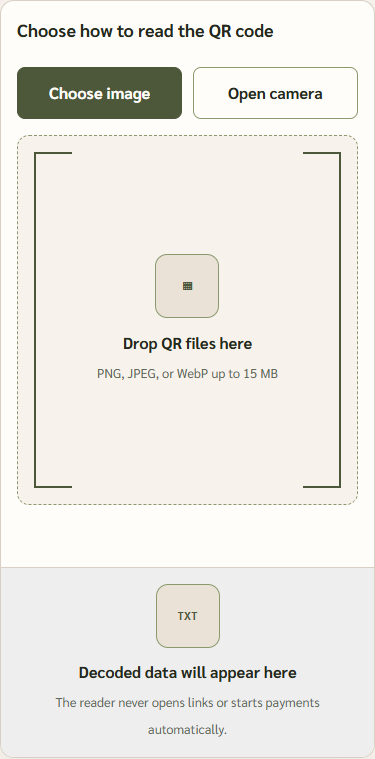
Read QR codes with KrobClick without immediately opening links
- Open QR Code reader
- Select a PNG, JPEG, or WebP image, or use the camera button if the browser permits it
- Read the data type and decoded text in the results panel before doing anything else
- If it's a URL, check the complete domain name and path. If it's PromptPay information, check the recipient and amount from your bank app before confirming.
- Open links only when confident and choosing to proceed yourself
According to the tool page code checked in the repository, images up to 15 MB are supported and the results are displayed without opening the URL or auto-starting the checkout. Reading the image is done in the browser according to the tool page description. The tool’s browser behavior was not tested in that review.
If the QR cannot be read, check that the image is clear, has complete patterns, and has no cropped or damaged edges. If the camera doesn't work, check your browser's camera permissions or select a file instead. Being illegible does not indicate whether a QR is safe or dangerous. As for being able to read, it doesn't mean that you have to open the destination.
Images decode in-browser; reviewed code includes no image upload. Opening links yourself contacts destinations under their own terms. Do not send QR text containing Wi-Fi passwords or personal information to others merely to ask whether it is safe.
Check the domain and context, not just a brand name in the URL
| Findings | Reasons for caution | What to do |
|---|---|---|
| A link with a one-character misspelling of the organization's name | May be an imitation website | Use an official app or website you open yourself |
| The QR is on a sticker placed over the original label. | The destination may change. | Ask the venue administrator |
| Requests immediate password entry | May be an attempt to steal information | Stop and verify through another channel |
| The domain name is correct but the page requesting information is unusual. | A domain alone does not guarantee complete safety | Pause to check before entering information |
Use these examples to identify points that need further checks. The absence of the signs in the table does not establish that a link is safe. Short links and redirects may lead to a destination different from the first address shown.
Example of a fictitious domain name: https:// It has the word bank.example in front of it, but the entire hostname is bank.example.evil.invalid and is not under the domain bank.example The example uses reserved names for descriptive purposes. It is not a link to open or a list of actual dangerous websites. Read the full hostname before looking at the path, and don't use logos on web pages as proof of ownership.
HTTPS indicates that the browser's connection is encrypted; it does not certify the website owner's honesty. If a QR demands urgent payment or account verification, open the official app or site through a channel you know yourself rather than relying on that QR destination.
A valid checksum does not confirm that the recipient account belongs to the person you intend to pay
KrobClick's tool can read PromptPay data and check its checksum, but does not verify the number owner's identity, website safety, or successful payment. A checksum check only confirms compliance with some data-format checks; it does not verify ownership.
Before confirming payment, check the recipient name shown in the banking app, the amount, and the transaction’s purpose. If they do not match what you intended, cancel and contact the recipient through a trusted channel.
What to do after scanning a suspicious QR code
If you decoded the QR but have not opened the link or entered information, check the destination before proceeding. If you entered login details on a suspicious website, change the password through the official app or site, enable multi-factor authentication, and check the relevant accounts, following guidance from FTC on fake QRs Contact your financial service provider immediately if you find unfamiliar transactions.
Before opening a link or paying, check the decoded QR data and confirm the destination through a trusted channel. The image’s appearance or an unsupported “verified” label does not establish safety.
To create a QR code for sharing or printing, read Guide to creating a QR that is easy to scan which emphasizes image quality and quiet zones. This article focuses on reading data and assessing destinations before opening; it is not URL safety certification.
Sources
- US FTC: See a QR code parked somewhere? Don’t scan it…yet! (September 2026)
- US FTC: Scammers hide harmful links in QR codes
Tool source and FTC warnings reviewed October 16, 2026. We did not test actual cameras or QR files or verify any user URLs.