
Google AI Studio Safety Settings: Filters and Their Limits
Does tightening Safety Settings make an AI app’s answers consistently accurate and safe? No. Content filtering and answer-quality checks address different problems.

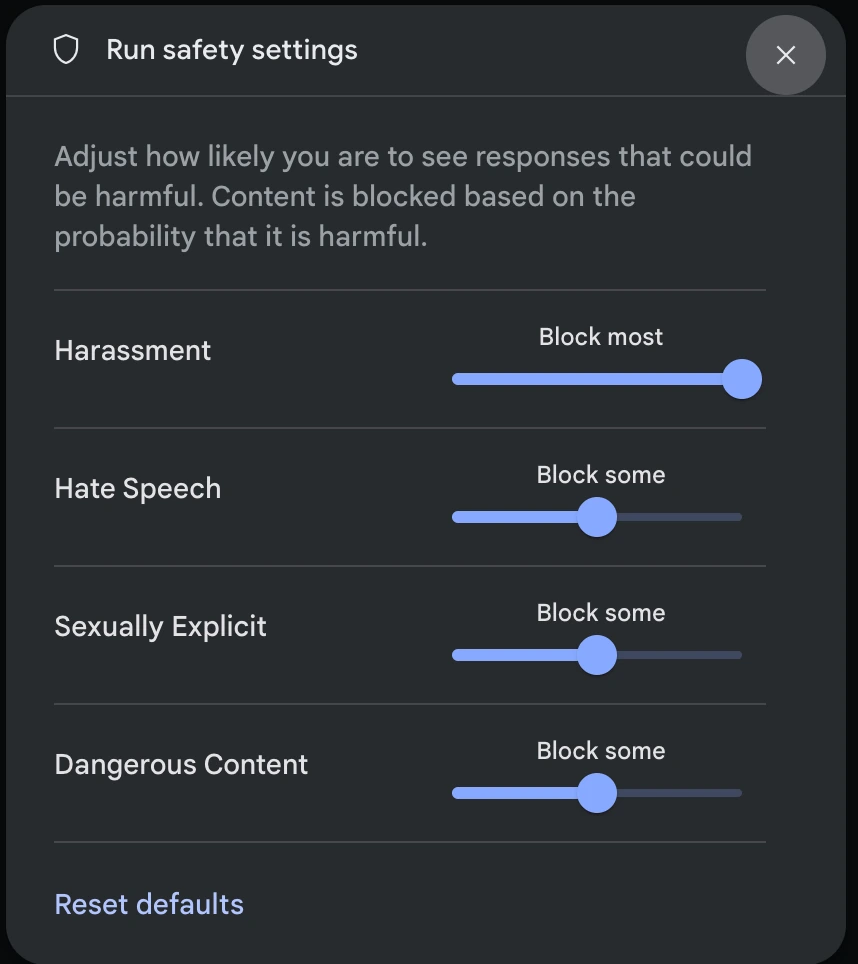
Safety settings filter content by risk category
In Google Safety settings documentation developers can adjust blocking levels for some content categories when prototyping with the Gemini API and Google AI Studio. Filters assess the probability that text falls into a risk category; they do not check whether an answer has complete evidence, is mathematically correct, or suits every user.
Messages that pass the filter must still be validated before being used. Especially information that affects the user's rights, money, or decisions.
What do Block few, some, most and Off mean?
| Levels in AI Studio | How probability-based blocking works | Points to understand |
|---|---|---|
| Block few | Blocks when the assessed probability of belonging to a risk category is high | Text assessed at lower probabilities may still pass. |
| Block some | Block medium and above | Stricter than Block few |
| Block most | Block low and above | May block legitimate text in some cases |
| Off | Turn off the adjustable filter in that category. | does not disable all core model protections |
Google documentation reviewed on October 17, 2026 states that adjustable filters default to Off for Gemini 2.5 and newer, while core protections cannot be disabled. Actual settings and categories may vary by API or model; check the chosen model's settings first.
How to test filters in Google AI Studio
- Open a task using the desired model in Google AI Studio, then go to Run settings → Advanced settings → Safety settings, following Google's Guide Menus may change with UI updates
- Define users, app purpose, and prohibited content, then choose suitable settings without relaxing them merely to obtain an answer
- Prepare safe test messages, such as ordinary questions with ambiguous words, educational questions on sensitive topics, and questions with insufficient information
- Record the results of whether the app answers, rejects, or reports Content blocked, and checks the answers that are not blocked to see if they are correct or not.
- Provide understandable messages when the system does not respond instead of retrying the same request indefinitely
Hypothetical example: An assistant explains return requirements.
Suppose a store uses AI to explain its returns policy. “Returns within 7 days” may pass a safety filter but is still wrong if the store allows 14 days. The administrator must supply the current policy, specify its effective date, and check answers against the original. Raising the setting to Block most does not check whether the return period matches the policy.
Set clear review criteria: the AI must answer from the conditions in the document, cite the relevant section, and say when the information is missing. The operator should also test partial returns, damaged products, and policies that have since changed.
What the filters cannot do
Google recommends Developers should assess risks, test, and inspect model output: unblocked answers may still be wrong, biased, or inappropriate. AI Studio trial settings do not guarantee identical settings across every production API call. Check the live service configuration too.
Before launch, check production filters, answer accuracy, and permissions for source data. This article interprets documentation; it neither calls Gemini API nor tests filters.
Sources
Developer documentation reviewed October 17, 2026. Settings were not tested on a real account. Shop examples are hypothetical; filters and UI may vary by version.