
Concat Video Editor: Local Processing and Output Checks
Want to edit clips locally without linking another account? Concat is an open-source option positioned by its developer as a CapCut alternative. Its beta status and actual output quality need evaluating separately from its feature list.

Concat is an open-source video editor in beta
Concat is a video editor its developer describes as local, requiring no account and exporting without watermarks. The README describes multitrack clips, text, keyframes, effects, and AI transcription, speech generation, and background removal, positioning Concat as a CapCut alternative. These are project descriptions; KrobClick has not independently compared quality or speed.
The project is in beta and has releases for multiple platforms, but an installer does not guarantee that every feature works the same way on every machine. Read the release notes for the version you plan to use for your operating system and architecture. Do not treat the main branch's feature list as a guarantee for every installer.
For example, the version 0.2.11 release notes say the developers fixed black frames at cuts and changed how the Windows preview recovers from a black screen. In some fallback cases effects are not displayed. The developers also say they could not test the Intel Mac caption-generation fix on an actual Intel Mac. Even with this version, check cuts, effects and the exported file with your own footage. These are developer reports, not KrobClick test results.
Readers of FilmCraft in the Crafting Apps suite can use it to choose a type of creative tool. This article focuses on Concat and how to evaluate Thai clips, offline use, and exported files before moving a project.
When Concat needs an internet connection
The README describes a Rust native engine and GPU compositing. AI models must be downloaded through Settings before offline use. The policy in CODE_SIGNING.md states that there is no telemetry or transmission of project and media data. Network access still occurs when users request update checks or download versions or models.
Local processing includes setup as well as operation; setup still needs internet. Before offline use, prepare models and actually disconnect while testing opening, editing, transcription, and export. These are proposed tests; we have not verified offline operation.
Local storage reduces footage uploads to editing services but does not replace device maintenance, backups, or sync management. Cloud-synced project folders may still send data off-device through another application. Assess the complete file path in actual use.
The text panel shows formatting options; it does not establish subtitle accuracy
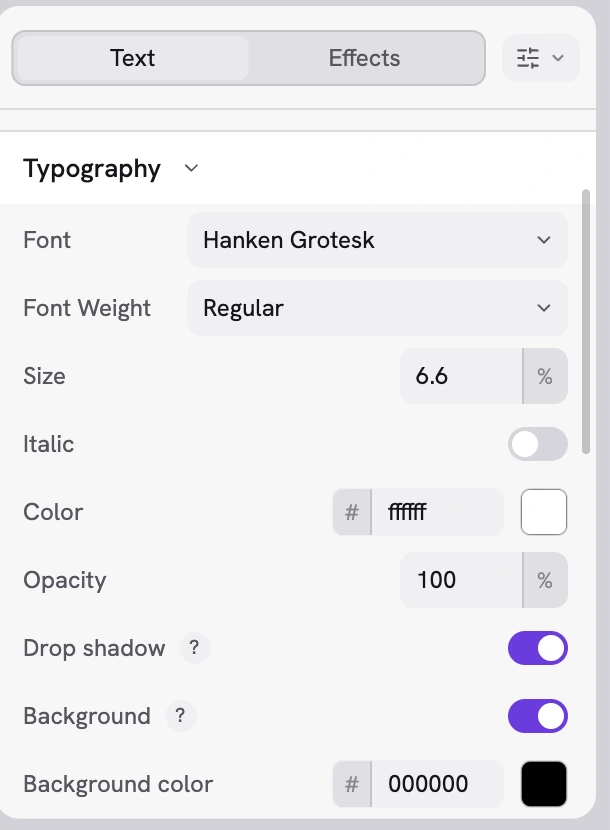
The image confirms that the demo interface offers text-styling options. Whether Thai transcription is accurate, stacked tone marks render correctly, and subtitles match the audio requires separate examination of actual clips. Review auto-generated captions before publishing.
For short mobile videos, check proper names, numbers, spacing, and line breaks. Test Thai upper and lower vowels and tone marks, check for clipped characters, and confirm readability after exporting and opening in another player. Choose a properly licensed font with genuine Thai support.
Test one clip from import to opening the exported file
First use a licensed, nonsensitive clip copy. Set a hypothetical task: a short Thai explainer containing English words, proper names, and numbers. Write your own reference transcript so errors are easier to check than with a clip whose full content you do not remember.
| Step | What to try | What to record |
|---|---|---|
| Import | Open the clip on the device you actually use | Program version, operating system, codec, image size, and frame rate of the original |
| Edit | Trim the beginning and end, separate sections, and move clips. | Cuts, black or frozen frames, and audio after moving clips |
| Subtitles | Transcribe the audio and compare it with your reference transcript | Model name, transcription errors, timing, and sections that need manual correction |
| Save | Close and then reopen the project. | Media links remain intact, and text and effects restore correctly |
| Export | Export to the target format and open it in another player | Duration, audio-visual synchronization, image dimensions, text, and issues absent from preview |
For vertical video, test vertically from the start and check text and key elements stay in frame. For multiple audio tracks, listen to the exported file too: preview and export can fail separately.
For background removal, use scenes resembling real work and inspect hair edges, hands, movement, and areas close in color to the background. Voice generation or imitation requires rights and consent from the voice owner. Software capability does not grant permission to impersonate someone using their voice.
Set task-specific criteria before testing: captions checked in full, no damaged frames, and a project that reopens for editing. Compare speed only for comparable workloads and models. Do not conclude it can replace existing tools before checking the exported file.
Check the installer and API scope before expanding your workflow
The reviewed policy says Windows builds lack code signing and may be blocked by SmartScreen or Smart App Control. Verify release pages, publishers, and checksums if available. Do not disable device-wide protections just to follow a brief recommendation. Stop here if provenance remains unverified.
Concat's API allows script or agent control. Remote API is disabled by default; when enabled, it listens locally with token authentication unless configured otherwise. Manual editing does not require it. Agent integration adds checks for accessible files, allowed actions, and connection exposure.
Start with a copy of a small project and keep the original files and existing tools until the required workflow passes review. Use the feature list to choose what to test, then inspect the exported file before adding complexity or deciding that the editor suits your work.
Developer documentation and images
- Concat: README pinned to reference version
- Concat: Code signing and Privacy policy
- Concat: Downloads and release notes
- Concat: policies for mentioning the product and using screenshots
The repository was checked on October 18, 2026, at commit f70332cc. The version 0.2.11 release notes were checked separately on November 16, 2026; other sources were not reviewed again. The image is a developer demonstration, not a KrobClick test. We did not install the program, test Thai captions, or verify performance. Downloads may differ from the main branch, and capabilities may change.