
How to Fix JSON Errors: Check Brackets, Quotes, and Commas with KrobClick
If JSON copied from a chat or API produces a SyntaxError, inspect the syntax before changing the data. This guide covers common errors and uses KrobClick to make valid JSON easier to read.

JSON Formatter checks syntax, not whether the data is true
KrobClick JSON Formatter provides Format and check, Minify JSON, Copy result and Clear . Data is processed in the browser without uploading to a server. Use it to locate syntax errors and format whitespace for readability.
“Pass” here means syntactically valid JSON, not fields matching the receiving API or factual amounts, names, and dates. Under the standard RFC 8259 JSON has a stricter syntax than objects in JavaScript in some cases.
How to fix JSON commas, quotes, and invalid literals
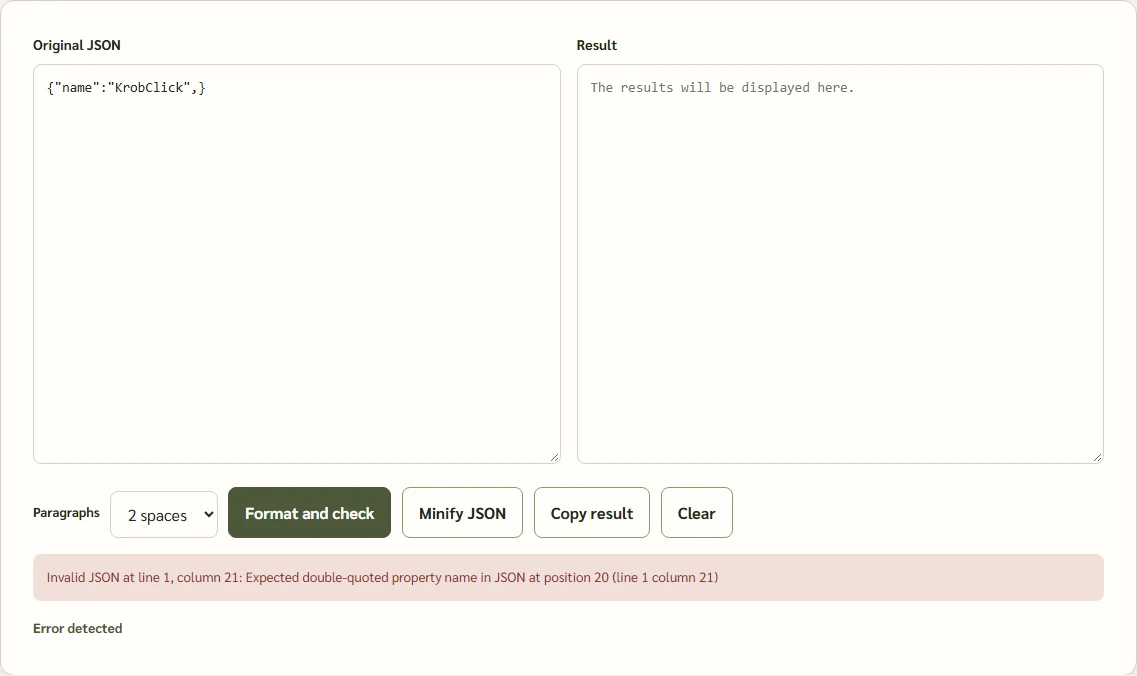
1) An extra comma before the closing bracket
Invalid example
{"name":"KrobClick",}Corrected example
{"name":"KrobClick"}2) Enclosing keys or values in single quotes
Invalid example
{'name':'KrobClick'}Corrected example
{"name":"KrobClick"}3) Missing double quotes around a key name
Invalid example
{active:true}Corrected example
{"active":true}4) Incorrect capitalization of special values
Invalid example
{"active":True,"note":None}Corrected example
{"active":true,"note":null}These are hypothetical syntax examples. The rules for double quotes and the literals true, false, null come from RFC 8259 and the examples in MDN JSON.parse() . Trailing commas work in some JavaScript contexts but are not valid JSON.
Use KrobClick to inspect and edit without losing original data
- Keep a copy of the original text so incorrect edits can be reversed
- Open JSON Formatter tool and paste Non-confidential sample information into “Original JSON”.
- Press Format and check If an error appears, read the warning and fix the relevant location in the original.
- Select 2- or 4-space indentation, then press Format and check again to apply the selected settings, then visually inspect keys and values
- Press Copy result After checking, if you need a short text version, use Minify JSON
The tool parses and serializes JSON in JavaScript. Integers beyond JavaScript’s precision range may change. Compare important values with the original, particularly long identifiers or financial data represented as numbers.
If the text comes from a chat and includes a fence ```json around it, copy only the JSON inside: the surrounding Markdown is not data. For errors near the end, check earlier unclosed quotes, braces, or brackets. Do not add random symbols just to pass parsing while changing meaning.
JSON passed but the system still rejected it. What should I check next?
Suppose the receiving system expects the amount to be a number.
{"amount":150,"currency":"THB"}This example is valid JSON too, but the quotation marks make the amount a string.
{"amount":"150","currency":"THB"}If the system accepts only numbers for this field, it may reject the second example because the value does not match the schema.
RFC 8259 also warns that key names in objects should be unique, as they may be interpreted differently by different systems. For the tools used JSON.parse() . When output is serialized again, later duplicate-key values replace earlier ones. Parsing can therefore succeed while information is lost; check duplicate names before sharing.
Limitations of the tool and methods for checking results before use
The tool does not verify that financial entries are correct or come from trustworthy sources, and does not guarantee every destination accepts the same schema. Even with browser processing, avoid pasting passwords, API keys, or sensitive information on public or shared devices.
Practical approach: Check JSON syntax first, then verify that the data types and fields meet the receiving system’s requirements. Always compare important values with the original.
Sources
RFC 8259, MDN, and KrobClick source reviewed October 15, 2026. This does not verify production operation. JSON examples illustrate syntax, not real user data.