
Use KrobClick's electricity calculator: units, Ft, and totals
Same electricity use but a different total, or a calculator differing from the bill? Check consumption, user category, and Ft units first. A single incorrect field can substantially change the total.

Use billing data, not cumulative meter readings
KrobClick electricity bill calculator estimates normal MEA/PEA residential bills from consumption, category, and Ft, separating energy, service charges, Ft, and VAT. Compare the estimate with the actual bill.
Use the billing period's consumption in kWh, not the meter's entire cumulative reading. If calculating from manual readings, check reading methods and meter multipliers. Do not enter appliance watts directly as kWh: power and energy are different quantities.
Choose the category and enter Ft in the correct unit
- Choose MEA or PEA to match your electricity provider
- Look at the user type on the electricity bill and select 1.1.1 or 1.1.2. Do not select from the number of units this month only.
- Enter the units according to the billing cycle, such as 350 and check that you do not enter the payment amount in baht.
- Check Ft to be correct for the period. This field uses baht per unit. If the announcement is 16.23 satang per unit, 0.1623 must be filled in.
- Read the itemized amounts and instantly updated total, then copy the summary if you want to retain it for comparison
Under the PEA table, customer classification also depends on meter size and usage across consecutive periods. A single month’s 150-unit threshold is not enough to determine it. If the category differs from what you expected, check the bill or ask the electricity provider. The tool does not determine eligibility or change the customer category.
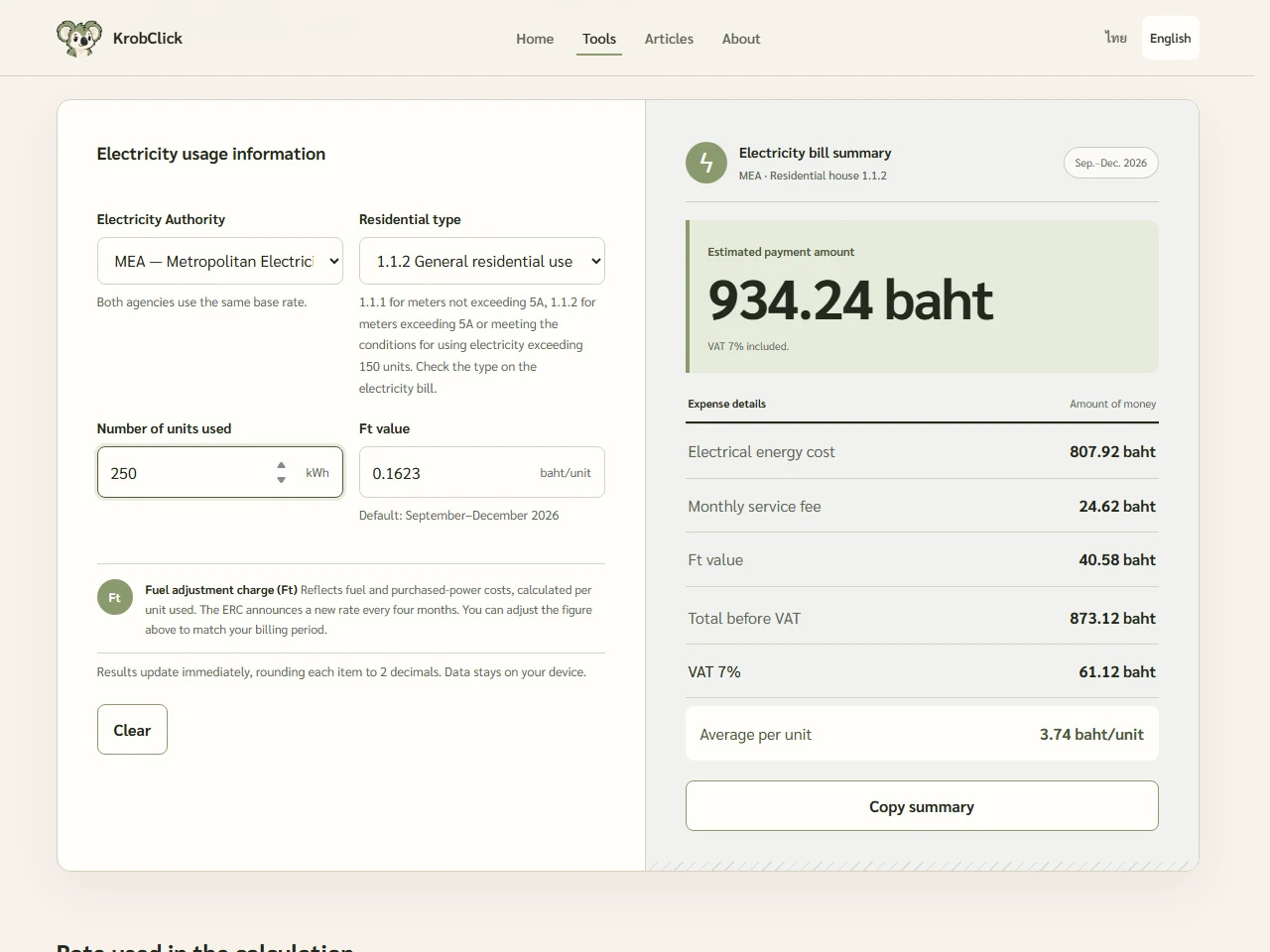
A 350-unit example you can calculate and check
Hypothetical type 1.1.2 household using 350 kWh and Ft of 0.1623 baht/unit for September–December 2026, checked against PEA on October 21, 2026. Applicable base tiers: first 200 units at 3 baht and next 150 at 4.1584 baht.
| items | How to check | Number of baht |
|---|---|---|
| Energy cost | 200 × 3 + 150 × 4.1584 | 1,223.76 |
| Service fee | Category 1.1.2 tariffs used in the example | 24.62 |
| Ft value | 350 × 0.1623, rounded to two decimal places | 56.81 |
| Total before VAT | 1,223.76 + 24.62 + 56.81 | 1,305.19 |
| VAT | 1,305.19 × 7%, rounded to two decimal places | 91.36 |
| Total | 1,305.19 + 91.36 | 1,396.55 |
| Average per unit | 1,396.55 ÷ 350, rounded to two decimal places | 3.99 baht/unit |
The system rounds energy and Ft charges to two decimals before totaling, then calculates 7% VAT and rounds again. Summing unrounded values once may differ by satang. The 3.99 baht/unit figure is this example's average including service charges and taxes, not a tiered rate applied to every unit.
Do saved electricity units reduce the bill by the average unit cost?
Not necessarily: reduced consumption may fall in tiers above the average rate, while service charges remain. Under the same category and Ft, reducing 350 to 300 kWh gives a modeled total of 1,165.39 baht, a 231.16-baht difference. Using 50 × the 3.99 average may therefore differ from tier-based savings.
Compare two consumption amounts while keeping the category and Ft constant. This models the tariff difference; it does not establish actual savings from an appliance or solar system. For solar evaluation, read the Solar conditions and evaluation articles separately from this bill-reading guide.
What to check when results differ from your bill
- Do the customer category and billing month match, especially for historical bills?
- Is Ft in baht or satang per unit, and does it match that period's announcement?
- Does the bill have any discounts, free electricity entitlements, outstanding balances, fees, or other adjustments that the tool doesn't include?
- Is it a normal or TOU tariff? This tool does not separate time-of-use billing periods.
- Does the program's base tariff match the desired billing period? Changing Ft alone does not change base tariff tiers or service charges.
Ft can be edited, but the tool does not fetch every new announcement. Check the default value and billing period against the PEA's Ft page or your utility’s announcement before using another period. At zero units, the model may still show service charges and tax, while the average field shows zero because there are no units to divide by. The total charge is not necessarily zero.
The tool calculates in the browser; it does not send bill data to the electricity provider for checking or payment confirmation. Use the actual bill to establish the amount due. If a difference remains unexplained, contact the provider with the customer category and billing period.
Sources
- PEA: electricity tariff table effective September 2026
- PEA: Periodic Ft Value
- Energy Regulatory Commission: Ft determination document
- KrobClick electricity bill calculator
Reviewed PEA tariffs, Ft announcements, and KrobClick code on October 21, 2026. Examples are hypothetical learning aids, not bills or confirmation of actual charges, and not personalized financial, legal, or tax advice.