
Claude Mods: Function Hooks, Loading Order, and Security
Claude Mods significantly change Claude Code: plugins can now directly intercept, alter, or replace some behavior, beyond adding commands or calling scripts. This article covers Function Hooks, event flow, API boundaries, and security considerations before installing third-party Mods.

What Claude Mods change in Claude Code
Claude Mods are an extension mechanism for Claude Code that was officially launched in Claude Code v2.1.287 on 1 October 2026. Mods are described by Anthropic as small pieces of TypeScript code that can change both the behavior and appearance of Claude Code, such as writing new prompts before sending them to the model, intercepting or fixing tool calls, adding its own UI, or replacing certain built-in features.
Before reading on: Function Hooks are still an early access capability, and Anthropic states that the API may change between releases without notice. The example and event names in this article therefore reference Claude Code v2.1.287 and should always be checked against the production version's type declarations.
The point that must be made clearly is that Claude Mods are not “modified versions of the Claude model” and do not change the weight of the Claude model itself. What is modified is agent runtime or harness of Claude Code This is the layer that manages prompts, tool calls, permissions, sessions, UI, and connections to surrounding systems.
Before Mods, plugins, skills, MCP servers, and settings hooks extended Claude Code within defined boundaries. Mods can participate directly in the events Claude Code is processing, bringing extensions closer to its core.
Function Hooks are central to Claude Mods, rather than another block of prompts
Anthropic uses the word Function Hooks as an engineering term, and uses the term Claude Mods At product level, the idea changes hooks from external scripts triggered by events into JavaScript or TypeScript functions loaded with the session and participating in Claude Code's event chain.
A Mod generally remains a regular plugin with a manifest in .claude-plugin/plugin.json but adds files hooks/hooks.json to identify the module Claude Code must load. The module then exports the function register(on, options) to subscribe to relevant events
The conceptual syntax for a hook looks like this.
export function register(on) {
on("turn.complete", async ($, event, next) => {
const result = await next(event);
await $.ui.toast("Turn finished");
return result;
});
}
This example doesn't change Claude's answer, but it does show three important ideas: $, event and next which is the core of the entire Mods architecture.
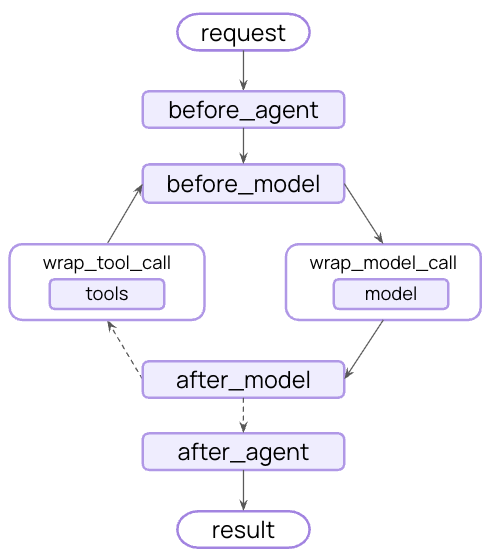
Three elements that make Mods more powerful than traditional Hooks
$is the engine's set of capabilities: Mods use this object to access things the Claude Code allows, such as the UI, session, state, store, filesystem, process, HTTP, tool, command, model or clock. The actual scope depends on the system version and policies.eventis the event information: such as an imminent tool call, a newly submitted user prompt, or UI about to render. Mods can read this data and, in many cases, create a new event to pass onward.nextis continuation: When callingnext(event)The event continues to the next Mod and eventually normal Claude Code behavior. If a Mod does not callnextYou can respond to the event yourself or stop the event.
This resembles Express or Koa middleware more than traditional callback hooks: Mods can act before, after, around, or in place of entire events.
Observe, Rewrite, and Answer: three ways to intervene in events
For clarity, this article groups Mod behavior conceptually into three patterns. Observe, Rewrite, and Answer below are not Anthropic's official API categories.
- Observe: Leave the original event running and read the results later. Great for telemetry, audit logs, usage trackers, or UIs that show status.
- Rewrite: Create a new event and send it to
nextFor example, modify prompts, change tool-call parameters, or add conditions before forwarding - Answer: Returns results from Mod without calling
nextThis allows mods to reject tool calls, respond to slash commands themselves, or override some built-in behavior.
Rewrite and answer capabilities let Mods participate in engine decisions rather than simply receive event notifications, distinguishing them from shell hooks.
With multiple Mods, loading order matters
Function Hooks use a layered model. When several Mods intercept an event, the first loaded sees it first and receives returning results last, allowing it to wrap later-loaded Mods.
Suppose mods A, B, and C intercept the same tool call. A simplified flow is A → B → C → Claude Code, with results returning through C → B → A. Plugin order therefore directly affects policy and security, beyond how items are listed.
An obvious example is sec-default which Anthropic uses in Team, Enterprise, or managed-settings environments to put organizational requirements outside user-installed Mods. Ordinary Mods should not override critical policies such as permission deny rules.
What can Claude Mods do in practice?
According to Anthropic's documentation, the mod's scope covers both agent behavior and the Claude Code interface.
- Modify prompts before they reach the model: Use to add context, adjust formatting, or enforce rules in specific situations
- Intercept tool calls: Allow, deny, edit arguments, or retry under specified conditions
- Manage permissions: A Mod can participate in approving or denying actions
- Filter results before the model sees them: such as hiding secrets or adjusting tool output
- Drawing additional UI: Create panes, bars above the prompt, buttons, inputs, or other elements in the terminal and Claude Desktop
- Create a new command or tool: Make the plugin a specialized workflow that doesn't require you to go through a prompt every time.
- Store state: Use session or persistent-store data for continuity across events
- Additional model calls: Can create reviewers, side agents, or multilayer reasoning workflows
How are Mods different from Plugins, Hooks, Skills and MCP?
These terms are in the same ecosystem but solve different levels of problems. Choosing the right one reduces complexity and eliminates unnecessary permissions.
- Plugin: is a distribution “package” for extensions that may contain commands, skills, agents, hooks, or Mods. A Mod therefore does not replace a Plugin; it is one capability packaged within one.
- Settings Hook or Classic Hook: Suited to shell commands, HTTP, or prompts at specified lifecycle events. Useful for separate-process automation, but less capable than Mods of inserting UI or wrapping event chains.
- Skill: Focuses on conveying methods or workflows through instructions and supporting resources. It suits “how Claude should work” problems rather than runtime changes.
- MCP: Focuses on connecting Claude to external tools or sources such as services, databases, or APIs. It expands what the model can call, rather than primarily rewriting internal Claude Code events.
- Mod: Suitable when changing Claude Code's own behavior, such as interception, rewriting, rendering UI, or enforcing policy in the event chain
If a Skill, Hook, or MCP already meets the need, a Mod may add unnecessary complexity and risk. Mods are most appropriate when access to Claude Code's internal execution stages is truly needed.
| needs | A more suitable starting point |
|---|---|
| Give Claude a way of thinking, a process, or an answer pattern. | Skill |
| Run scripts or send HTTP requests for lifecycle events | Settings Hook |
| Connect APIs, databases, or external tools | MCP |
| Includes many types of extensions to distribute and install. | Plugin |
| Intercept, modify, or replace internal events, including drawing the UI of Claude Code. | Mod |
Runtime API limits do not make Mods a security sandbox
Claude Code type declarations say hook modules run in their own environment without a DOM or direct Node.js access. Files are treated as ES modules, with external capabilities accessed through $ However, Anthropic explicitly states in its launch announcement that Mods run with the same level of access as Claude Code and are “not sandboxed” in a security sense.
These statements do not conflict. “No Node or DOM” describes runtime API limits, while “not sandboxed” describes the powers a mod may receive through Claude Code, such as reading and writing files, launching processes, or accessing the network through engine-enabled capabilities.
Review a Mod as executable code being installed on the machine, with more scrutiny than a prompt template.
Risks that should be examined before installing mods from others
- Tool interception: Mods that intercept tool calls may change commands or arguments before they actually run.
- Prompt modification: Mods altering prompts or system context may change agent behavior without immediately visible UI changes
- Secret exposure: If a Mod can access files, processes, or networks, inspect routes through which sensitive data could leave
- UI deception: Because Mods can draw UI, distinguish built-in interfaces from plugin interfaces
- Ordering: Mods that appear safe when running alone may behave differently when placed before or after other mods.
- Version drift: Function Hooks are also evolving quickly. An API that works in one version may change semantics or type in the next.
For teams, a safer approach is to pin the Claude Code version, restrict allowed marketplaces, review Mod source code, and test with claude plugin validate and claude plugin test Before rollout, include checking for type declarations that are created using the actual version of Claude Code instead of relying on examples from old articles.
Read validation and test results within their scope. A valid package structure does not establish that a Mod sends no data externally, and its author’s tests may not cover your loading order. Check network destinations, written files, and denial cases in a separate environment before allowing access to real data.
Built-in Mods Show the Direction Anthropic Wants to Go
Anthropic has started moving some of Claude Code's features into mods so users can turn them on, off, or override them. Examples in the repository currently include: diff, sec-default, telemetry and agents-md At the time of release v2.1.287 added an opt-in mod called “You should know” which uses a side agent to monitor the session and report any issues that the user or Claude might have missed.
From this article's analytical perspective This direction has implications beyond adding more marketplaces because the architecture may be changing from “A product with a fixed core and open extensions” to a “thinner core and a number of interchangeable capabilities.” If Anthropic continues in this direction, Claude Code could become a platform for building agent runtimes rather than just a slightly customizable coding assistant.
Examples of Use Cases where Mods are more suitable than other methods.
- Security gate: Check every tool call related to production or important files and force confirmation in specific cases.
- Context dashboard: Show context, session, branch, or CI status in a pane without sending it to the model every turn
- Secret redaction: Remove the token or credential from the tool output before the message enters the model's context.
- Workflow reviewer: Use a side model to review key decisions, with notes separate from the main answer
- Custom diff experience: Change diff presentation or add interactions absent from the built-in UI
- Organization policy: Create a policy layer that covers other plugins and keeps an audit trail of calling various capabilities.
Use Cases that do not require the use of Mods
For a working guide, reusable command, API connection, or script that runs when a session ends, consider Skills, commands, MCP, or classic hooks first. They are often simpler, easier to review, and require fewer permissions than Mods. The broader control offered by Mods still needs to fit the task.
A useful principle is to choose the shallowest extension point that fully meets the need. If a Skill suffices, a Hook is unnecessary; if a Hook suffices, a Mod is unnecessary. Reducing privileges and intervention points lowers both risk and maintenance effort.
For a test plan without real-system access, use a mock tool that accepts text parameters and logs events. Combine an observing Mod A with a parameter-changing Mod B. Define expected results before swapping their order, then check the sequence around next and the values reaching the tool. Include denial cases where the tool must not run. Resolve any ordering mismatch before using real commands. This is a KrobClick test proposal, not a completed Claude Code experiment or a substitute for organizational policy review.
How to assess whether a mod is worth installing
- Look at the source first: Do not judge by a name or screenshot, because a mod can perform actions absent from the UI
- Look at the event hook: Mod that touches
tool.call, permissions, or prompts deserves stricter review than a Mod that only displays status - Look at the capabilities that are called through.
$: Filesystem, process, HTTP, and model calls are areas that should be especially checked. - See ordering: If the Mod is a security control, make sure it is loaded in a location that actually covers other Mods.
- Check compatibility: See which version of Claude Code the author tested with because Function Hooks change quickly.
- Test in a separate project: before deploying to an important repository or environment with actual credentials
How Mods extend the Claude Code runtime
Claude Mods lets developers add logic to Claude Code’s event pipeline, previously controlled by the application. Plugins can intercept tool calls, modify prompts, replace UI, and wrap policies, giving users more control over agent-runtime behavior.
Teams can build relevant workflows without waiting for Anthropic features, but the boundary between extensions and agent-control code becomes thinner. Source review, permissions, ordering, and version compatibility therefore matter more.
If you want to remember Claude Mods in just one sentence, think: Plugins are boxes that distribute extensions, and Mods are code inside the boxes that go into the Claude Code event chain. This is why Mods are more powerful and flexible and require greater caution than traditional extensions
Sources
- Anthropic: Customize Claude Code with mods
- Anthropic Claude Code: Release v2.1.287
- Anthropic Claude Code: Mods - make Claude 10x more extensible
- Anthropic Claude Code v2.1.287: Mods README
- Anthropic Claude Code v2.1.287: Function hooks TypeScript declarations
Information last checked October 6, 2026. Claude Mods and Function Hooks are evolving rapidly; event names, APIs, and capabilities may change by Claude Code version. Check documentation and type declarations for your actual version.