
AI Context, Memory, and Chat History: What Is the Difference?
AI may remember your writing style but forget yesterday's figures without being broken: retaining history, retrieving memory, and supplying model context can be separate steps.

Stored information is not the same as the information the model currently sees
When saying AI “remembers,” distinguish at least three things: Context is the information available for the current response. Memory stores and retrieves information across turns or tasks, depending on the system design. Chat history is the conversation record a product lets you revisit. These layers may connect, but they are distinct.
LangChain Memory documentation explains thread-level memory and long-term retention, while Anthropic's Context Engineering article explains how to select information for a limited context window. These sources explain the concepts; they do not establish that every AI app stores or deletes data in the same way.
This article explains general principles rather than product-specific privacy settings. To find out what an app stores and for how long, read its documentation and the settings for your account.
What's the difference between Context, Memory, and chat history?
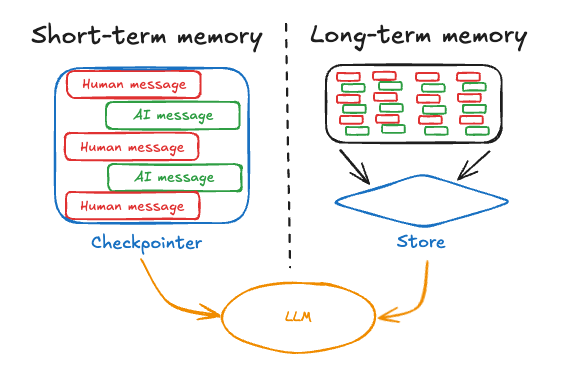
| Layer | Questions used for checking | What not to infer |
|---|---|---|
| Context | Which messages, files, or search results does the system send to the model for this response? | That every line of chat history is included in this response’s context |
| Memory | What does the system store, and when does it retrieve it? | That saving it ensures it will be used every time or always retrieved correctly |
| Chat history | Which conversation records can users revisit? | “Deleting a chat also deletes all memories and copies” |
Knowledge from model training is another layer. Editing chat messages or changing memory entries does not necessarily mean training new model weights. And remembering user information doesn't have to come from training the model. The system may simply pull old records and place them in context.
Context may include system instructions, tool results, and retrieved information that the user did not type. The chat screen may therefore show only part of the context. If the app does not expose those details, verification is limited to what it shows; asking AI to guess how the system works does not fill that gap.
Hypothetical example: Remember the style but use the wrong due date.
Suppose a user says, “I prefer short answers in Thai,” and previously planned to deliver work on Friday. Later, the deadline changes to Thursday in a long message in another chat. If the system saves the style as Memory but does not retrieve the deadline change, the AI may give the preferred short answer while using the outdated Friday deadline.
This is a hypothetical scenario to separate data layers. It is not a test result of the actual product. The solution for this task is to send current information along with new evidence that “The deadline applicable to this work is Thursday as per the latest announcement. Do not use days from the old plan” and then check the created plan to make sure that all parts use the same day.
Stable preferences such as language differ from temporary deadlines. KrobClick suggests dating temporary information and specifying task scope. Verify consequential details against current originals even when the system claims to remember.
Why does talking longer not always mean the system understands better?
Context is limited in size. And the system may cut, summarize, or search for specific parts to continue working as designed. Summarizing helps maintain the main idea. But details that aren't preserved may be lost, such as exceptions in old conversations. Opening the message history does not prove that the last reply received the message in full.
Anthropic discusses context management and notes for long tasks. We suggest keeping an updated task-status document separate from chat, distinguishing agreements from unresolved items without elevating summaries above original evidence.
Latest task status: The goal is a beginner's guide. Confirmed requirements are Thai language and Thursday delivery. The source is the latest announcement. Do not add prices or test results. The outline is complete; source and image checks remain. Identify missing information before continuing.
This text is a hypothetical template. Change it to match the actual work and delete unnecessary data before forwarding. For workflow, sending work across sessions, read more at Handoff articles and work context
For more on tokens and handling long documents, see Context Window Guide This article focuses on distinguishing stored data, memory retrieval, and what deleting history means.
Check memory retention and deletion in settings; AI responses do not certify them
- Can you view, edit, or delete saved Memory entries, and what information do they contain?
- Are chat history and Memory deleted together or separately?
- Do attachments, connected-app data, and work logs have separate policies?
- What are the storage, backup, or management requirements for the organization?
- Are model-training data controls separate from memory storage and use?
These are policy-review questions, not a guarantee every product provides all these menus. If AI says “forgotten” without verifiable deletion tools or indicators, do not treat that as proof of deletion across all system layers.
Carry work forward with current evidence
Memory may reduce repetitive entry, but deadlines, figures, contract terms, and permissions require current sources. Start new work with a concise status summary and links or files for the version used, then verify results against them.
Ask which version of the information an answer uses and what needs reconfirming. This helps identify outdated memories and clarify how far AI can be relied on.
Sources
Sources reviewed October 14, 2026, Thailand time. Thai examples and prompts are KrobClick proposals, not product tests. Features and settings vary by version/account. Check originals and outputs before real use.